
ChatGPT is a very useful tool, but not all features are always needed. In particular, it may be better to disable the memory function for privacy or specific purposes.
In this article, we will explain in detail how to disable ChatGPT's memory function and its advantages and disadvantages. Use ChatGPT more safely and effectively with proper settings.
table of contents
- table of contents
- What is ChatGPT's memory function?
- How to disable ChatGPT's memory feature
- PC
- Smartphone
- Benefits of disabling memory functions
- Enhanced privacy protection
- more accurate response
- Save storage space
- Disadvantages of disabling memory functions
- Personalization feature limitations
- Unable to check past conversation content
- summary
What is ChatGPT's memory function?
What is memory function?Ability to record past conversations with ChatGPT and allow AI to utilize them for later responsesis. Once you introduce yourself, they will recognize you just by calling your name, and when you dig deeper into a particular topic, they will remember your previous interactions, allowing for smooth communication. Although this memory feature is one of ChatGPT's great appeals, it's not always best to keep it enabled.The option to turn off the memory function is also important for privacy protection and specific use cases.It will be.
How to disable ChatGPT's memory feature
Disabling the memory feature is very easy. Please follow the steps below.
PC
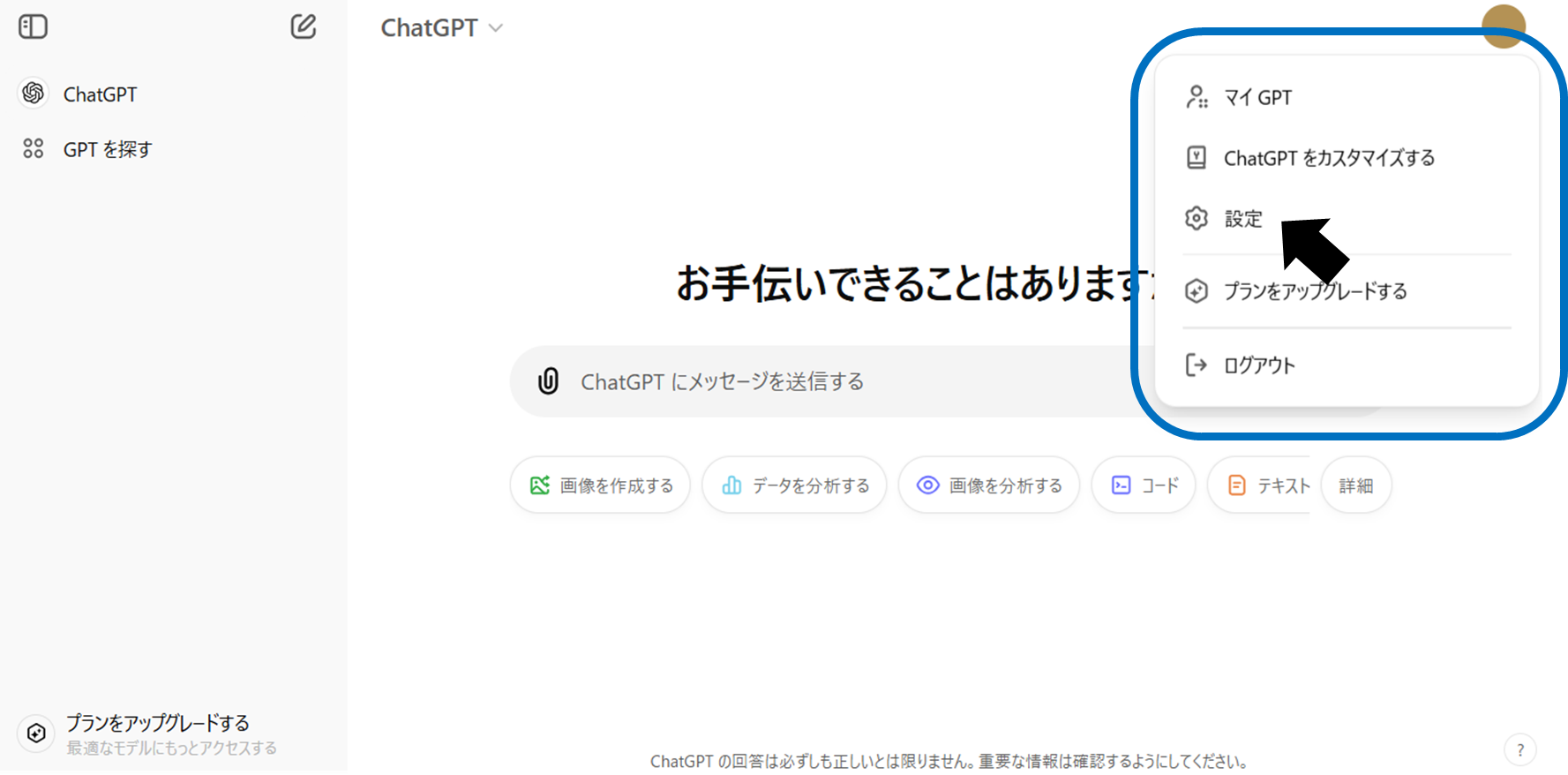
Click the icon at the top right of the ChatGPT screen to open the menu. Select "Settings".
Turn off the "Memory" toggle switch in the "Personalization" section.
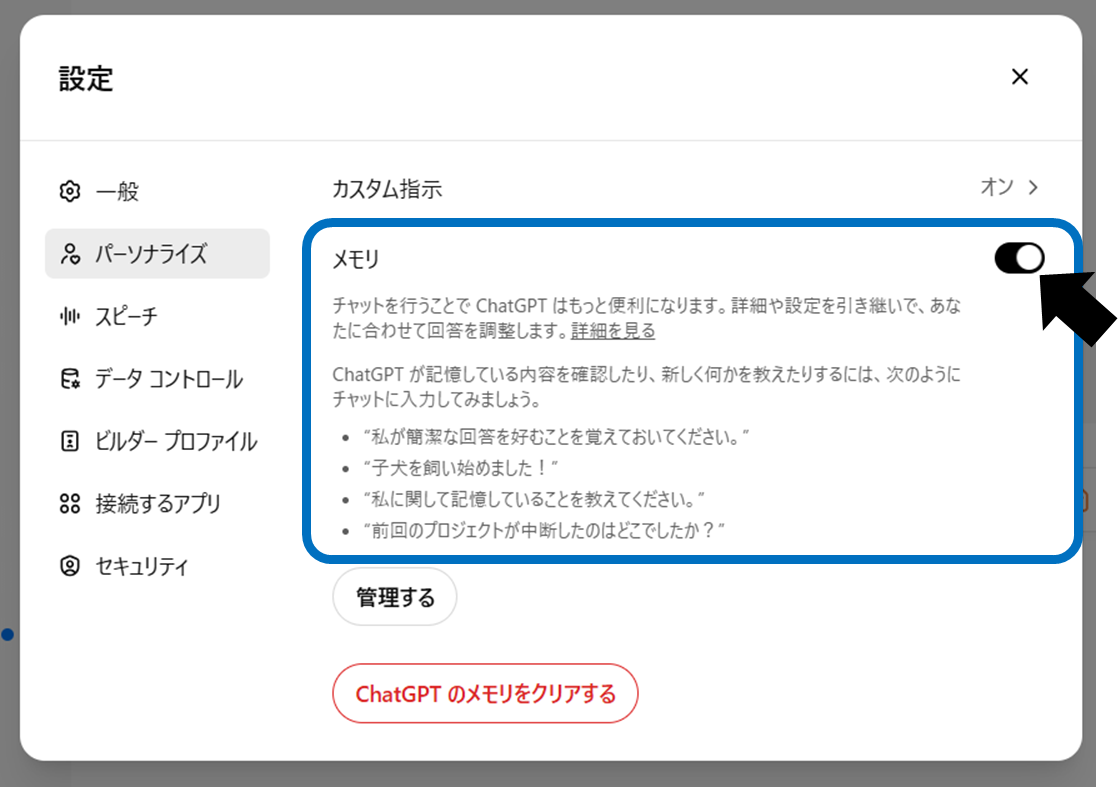
You can change this setting at any time, so turn it on or off as needed.
Even if you turn off the memory function, saved memories will not be deleted.. Additionally, deleting a chat does not erase the content remembered from that chat. If you want to erase the memory, you can clear it for each thread from "Manage" or all at once from "Clear ChatGPT memory".
Smartphone
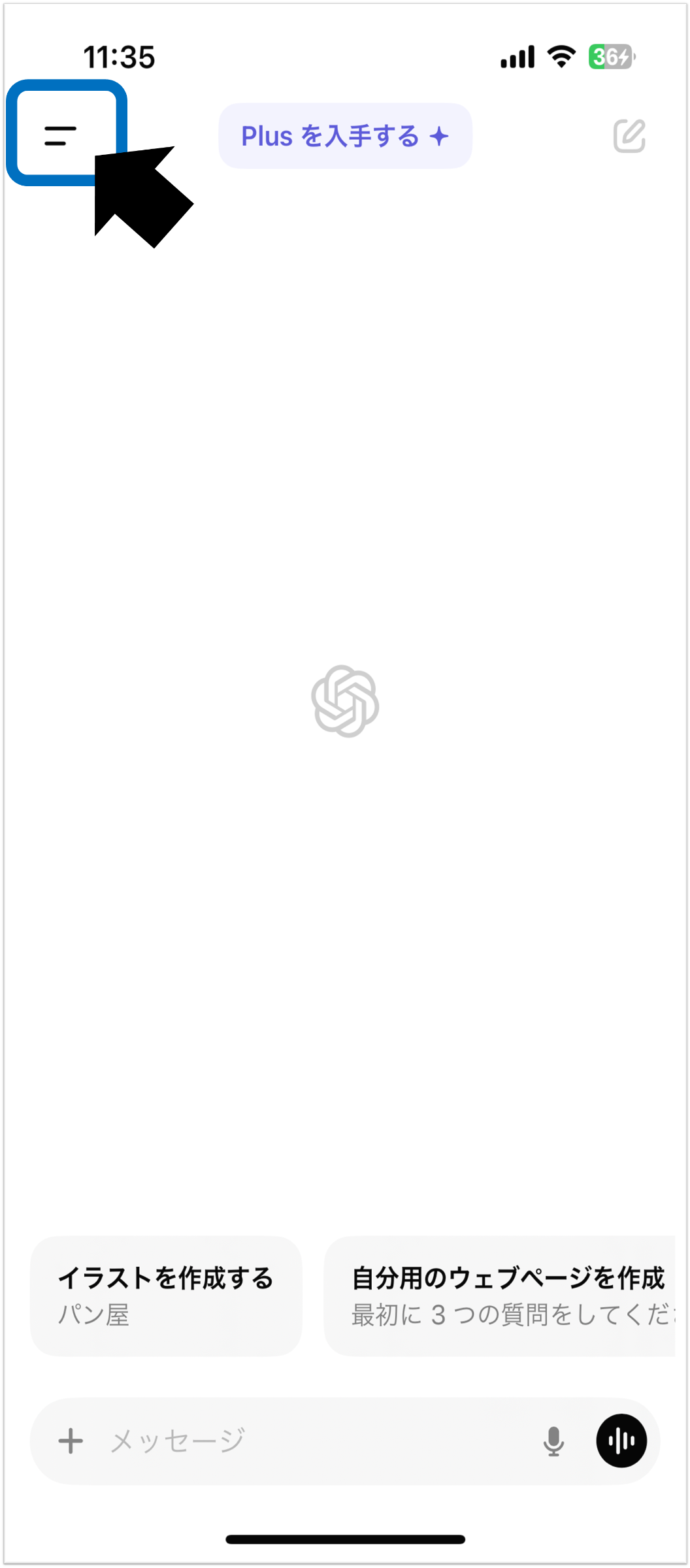
Click the icon at the top left of the ChatGPT screen to open the menu.
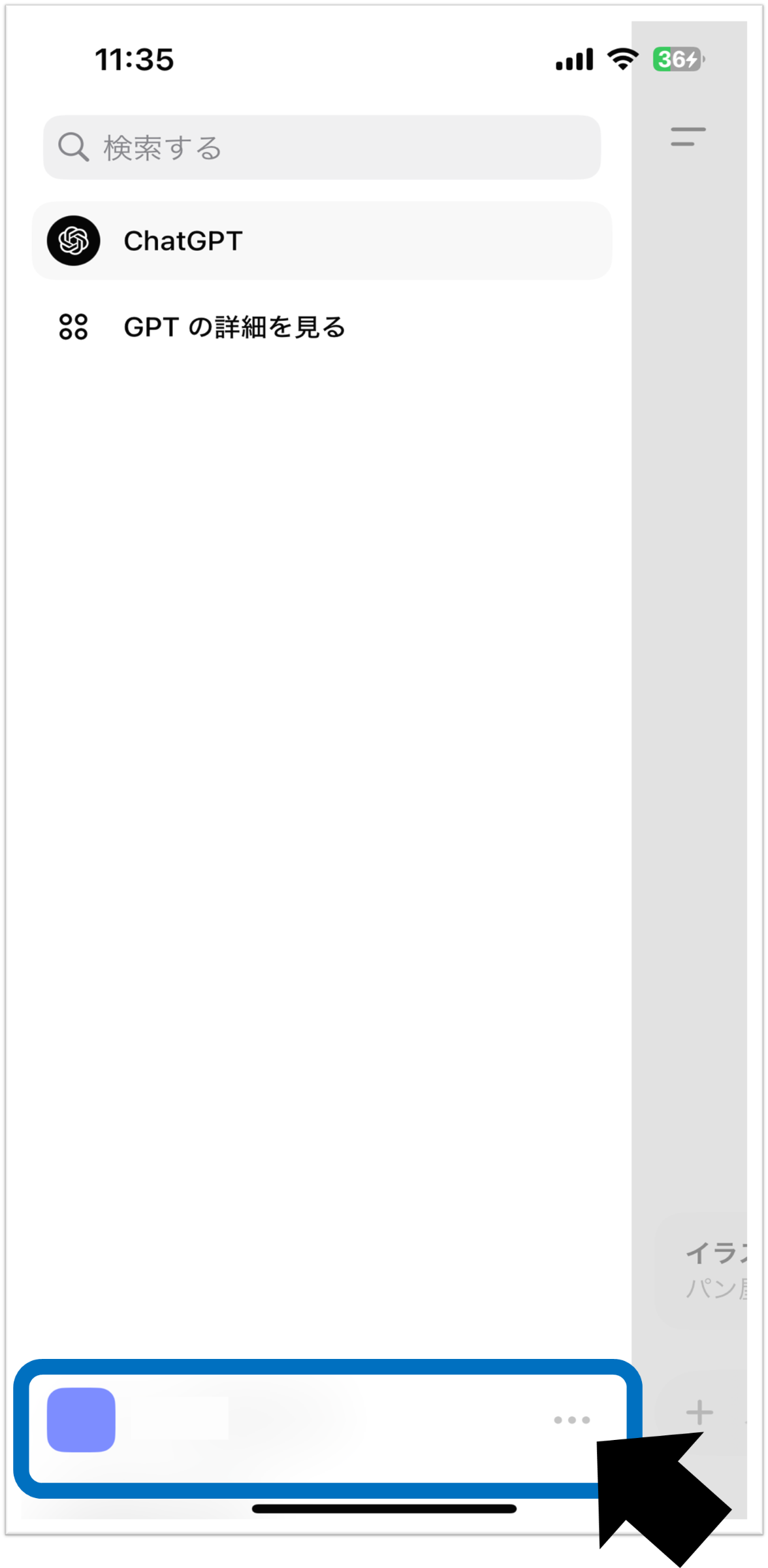
Click “…” next to the icon at the bottom.
Turn off the "Memory" toggle switch in the "Personalization" section.
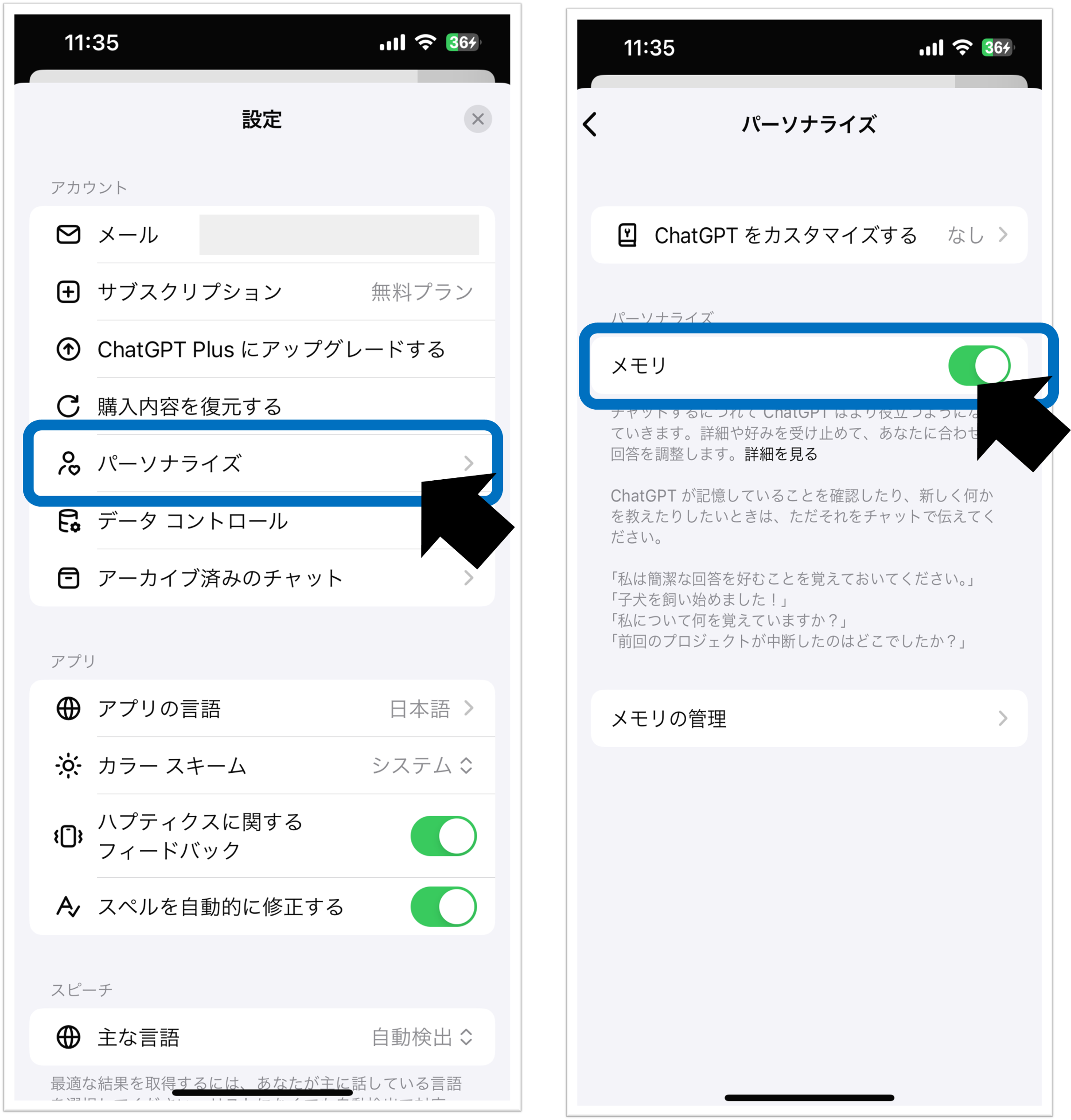
Just like with a PC, even if you turn it off, the stored memories will not be erased. If you want to completely clear the memory, please clear it from "Memory Management".
Benefits of disabling memory functions
Disabling the memory function has the following benefits:
Enhanced privacy protection
When handling personal or confidential information with ChatGPT,Disabling the memory function helps reduce the risk of information leakage.. This is especially useful when dealing with sensitive information, such as medical consultations, legal consultations, or questions about confidential company information. You should avoid entering passwords, addresses, phone numbers, credit card information, etc., but even if you do, disabling the memory function will reduce the risk of the information remaining on ChatGPT.
Data is stored on OpenAI's servers for a certain period of time and then deleted, but even if you disable the memory function,OpenAI may store logs for a certain period of time, so the risk of information leakage is not completely eliminated.. (For details, see OpenAIPrivacy policyPlease check)
more accurate response
Without being influenced by past conversation content,Effective when you always want to get answers based on the latest informationis. For example, if you want to try different code to resolve a programming error, solve a math problem without being influenced by previous answers, or repeat the same question with different assumptions, you can turn off memory to get more accurate answers. Prevents past conversation data from interfering when asking questions about new topics.
Save storage space
Since there is no need to store large amounts of conversation data, you can save storage space on the ChatGPT side. (Currently, there is no impact on user storage.)
Disadvantages of disabling memory functions
Disabling memory features also has the following disadvantages:
Personalization feature limitations
ChatGPT learns your preferences and context from past conversations to generate more personalized responses. Disabling the memory feature will make this feature unavailable. In other words,ChatGPT may have difficulty understanding the intent of what you say, and you may not be able to have a smooth conversation as before.There is.
Unable to check past conversation content
If you want to check the content of past conversations later,The history is not saved and cannot be viewed.. Please be aware that if you obtain important information and turn off the memory function, you will no longer be able to access that information.
summary
ChatGPTDisabling memory functionality can be very useful for privacy protection and certain use cases.It is a method. On the other hand, there are also disadvantages such as limited personalization functionality.
Please refer to the advantages and disadvantages introduced in this article and adjust the settings according to your usage situation. By effectively utilizing the memory function, you can use ChatGPT more conveniently and safely.