
When generative AI is introduced into daily work, practical bottlenecks include account authentication, initial login settings, accuracy management of response content, and responses to malfunctions in which the model claims to have "created a link" or "sent an email." Most of these can be resolved by checking the settings and operation, and it is possible to prevent recurrence by creating a procedure based on primary information.
In this article, based on Anthropic's official help, we will organize quick FAQs and operational points regarding "authentication, incorrect answers, and link generation" that frequently occur in the field.
table of contents
- table of contents
- Initial troubles and confirmation procedures for authentication/login
- Understanding and verification flow of answer errors (hallucinations)
- Correct interpretation of the “link generated/sent” display
- How to choose a support contact and how to reach it
- Operational checklist for preventing recurrence
- summary
Initial troubles and confirmation procedures for authentication/login
We will summarize the points to be considered first as confirmation points.
If you do not receive the verification email,Confirm incorrect email address input, resend email, check spam folderis recommended.
If you receive the verification email but cannot log in,Refreshing browser cache/cookiesis being guided.
The SMS verification code may take several minutes to arrive.Resend link if there is no response for more than 5 minutesuse. VoIP/Landlines are not covered, only numbers in supported regions are valid.
You cannot log in with a phone number outside the target area. Physical location must also be in a supported region.
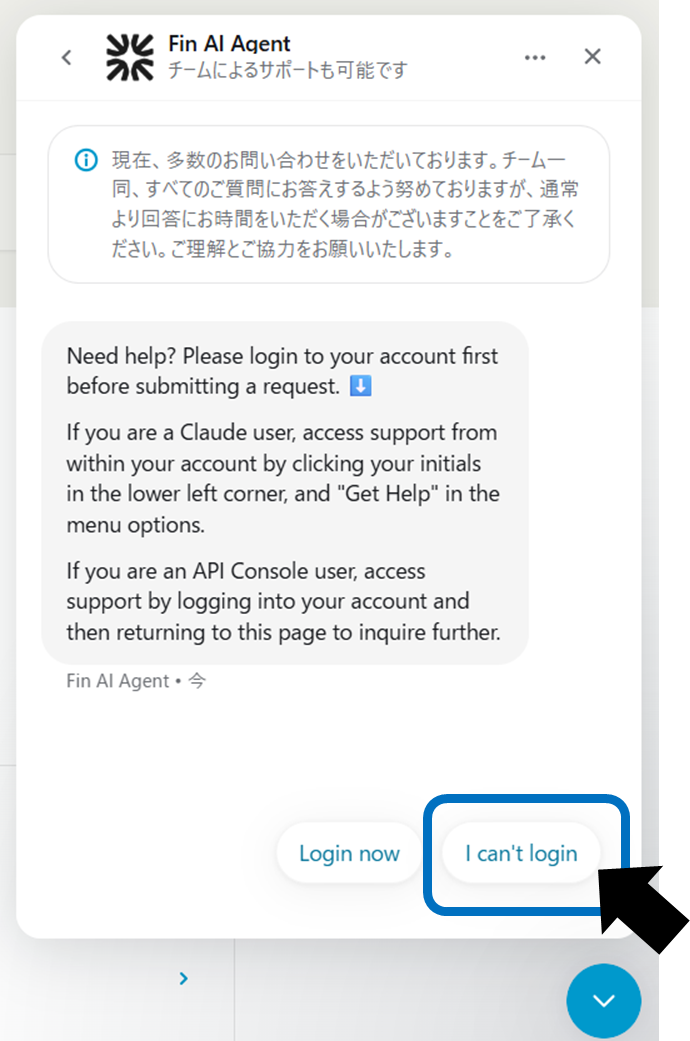
If the above checks do not resolve the issue,Help centerSelect "I can't login" from the messenger at the bottom right and proceed to support such as subscriptions and data export (for paid plans, the team in charge can also help).
Understanding and verification flow of answer errors (hallucinations)
In an effort to improve its usefulness, models can sometimes return false information with a high degree of confidence. The symptoms and solutions are as follows.
phenomenon | Typical example | Possible cause | Key points to deal with |
|---|---|---|---|
plausible wrong answer | Confident explanations and quotations, but source unknown | Lack of latest knowledge, complement at generation time | Thoroughly check and compare sources for important matters |
false citation | Quotes that seem authoritative but are not real | Mistake in reference source | Verify the cited link/original source |
confusion about current events | inaccurate summary of recent events | training data time difference | Update and re-inquire through web searches and primary information |
Rather than relying on the information used for important decisions as the sole source of truth, we incorporate a human verification flow into our operations, including checking citation sources.
It has been pointed out that while the use of AI can bring great "empowerment" in terms of knowledge and time, it is necessary to be intentional about how it is designed and shared. The verification flow in this paper is an operational strategy that meets these assumptions.
Correct interpretation of the “link generated/sent” display
Even if your model claims to have sent an email or created an external document, no actual external operations will be performed unless you explicitly enable the integration.
[What cannot be done]
Sending emails, creating external files, transferring files, etc. without enabling integration. Even though the model claims it is not being executed.
[What you can do】
Gmail/Google Calendar/Google Drive/Google Docs, etc.Enabling official integrationAfter that, we will provide support for searching, viewing, summarizing, etc. Operation is limited to the scope of the tool's authority.
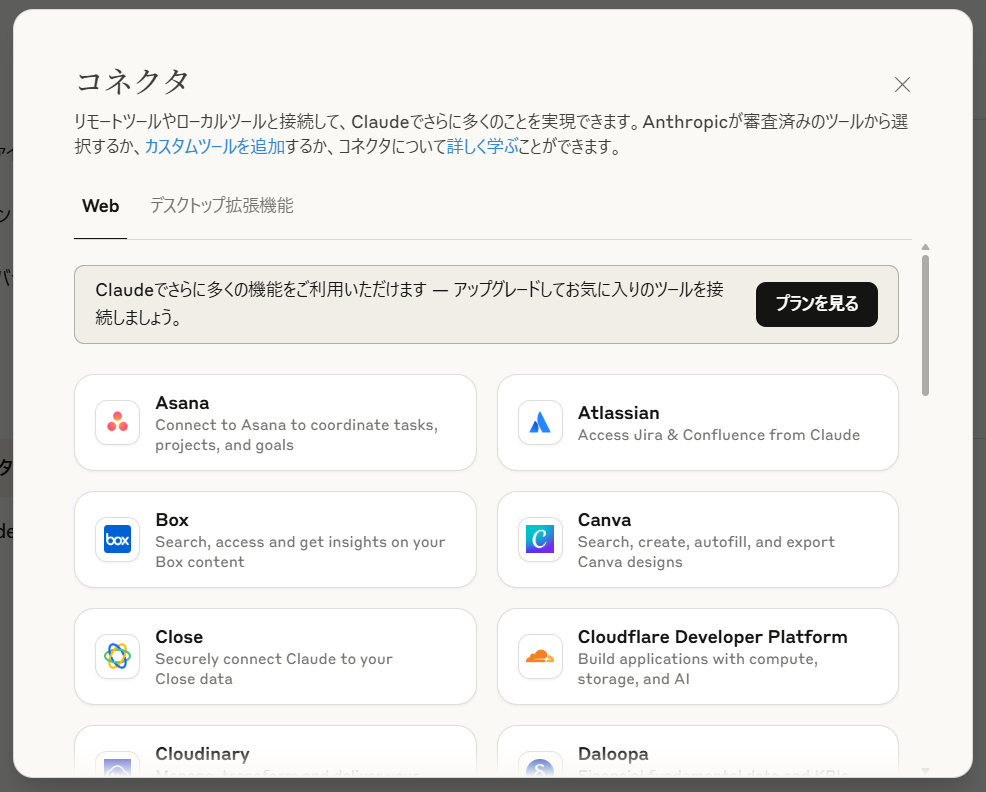
To avoid misunderstandings, be sure to perform and confirm important external operations (sending, sharing, publishing) on the user side, and check the actual sending history and sharing settings for generating shared links and sending emails.
In addition, regarding web-related behavior, if web search is turned on, it is possible to fetch the presented URL and generate answers based on the search, but this is different from "operation of sending to an external service".
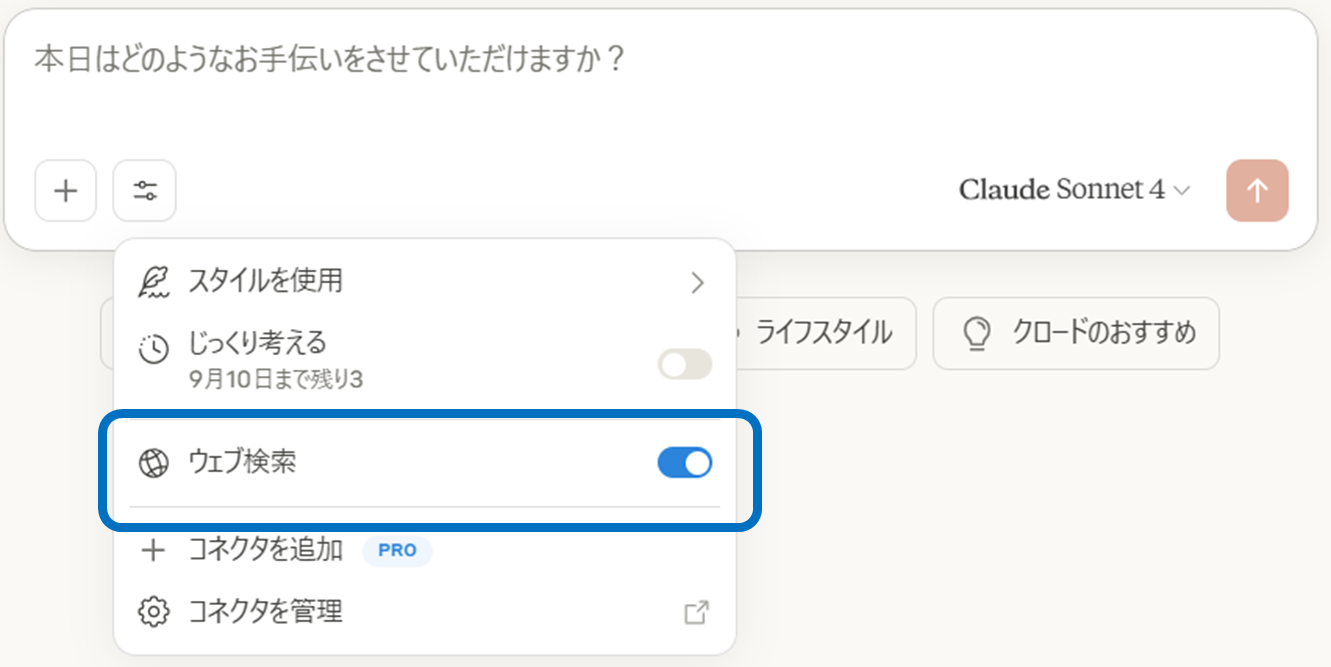
By understanding this difference, you can prevent malfunctions and disappointments and use it safely in your work.
How to choose a support contact and how to reach it
The means of reaching the destination will differ depending on the situation, so please refer to the following organization.
Usage status | means of reaching | How to reach | remarks |
|---|---|---|---|
Paid plan (Pro/Max/Team/Enterprise/API Console) | Help Document/AI Bot (Fin)/Responsible Team | “Get help” at the bottom left of the app → Search on Messenger/Consult with Fin → Team support available when needed | Phone calls and live chat are not available. |
Free plan | Help Document/Fin | “Get help” → Search on Messenger/Consult with Fin | Support for account deletion. |
Unable to log in | Messenger (even if you are not logged in) | Message icon at the bottom right of the Help Center → Select "I can't login" | We also provide data export/subscription support. |
Users within the EU (DSA contact point) | Designated counter | Start with chat from the EU page | Single point of contact under DSA. |
The route to each contact point differs depending on the plan and situation. If you write a short summary of the content and purpose of your communication (isolating a technical problem or processing an account) before entering Messenger, the resolution will be faster.
Operational checklist for preventing recurrence
The effects will last if you incorporate it into daily operations rather than just a one-off response.
Add the domain from which the authentication email is sent to the allow list and use internal email rules to prevent spam sorting.I will.
The primary response in the event of a login failure (refreshing cache/cookies, contacting via messenger) has been clearly stated in the internal regulations.I will.
Enabling and designing permissions for linked functions (Gmail/Calendar/Drive/Docs) and actualExternal operations define rules for final confirmation by humans..
We have established an on/off policy for web searches, and always conduct primary source checks and manual reviews for important cases.
It is effective to create a short checklist for operational rules. We will set up a "failure/wrong answer review" at regular meetings and update the response record.
summary
When incorporating generative AI into business, it is essential to organize initial problems with authentication and login into a mechanism, use the model to correct incorrect answers in the verification flow, and assume that the final confirmation of external operations is always made by the user himself.
By incorporating these basics into operational rules, utilizing the support desk, and conducting regular reviews, you will be able to create a system that can be used continuously with peace of mind.