
Gemini's "Chat Sharing" feature allows you to easily share chat content via URL. While they are useful in a variety of situations, from sharing ideas within the company to communicating information to business partners, there is also a risk that public links can be accessed by anyone.
In this article, we will explain in detail how to use the functions and how to manage risks. We will introduce key points for increasing operational efficiency while protecting information, along with specific examples.
table of contents
What is Gemini's "chat sharing" feature?
Gemini hasShare the chat screen itself via URL (public link)There are functions that can be done. The biggest advantage is that anyone who knows the URL can easily view questions and answers posted on Gemini.
Convenient for sharing within the company or with business partners
For example, you can share "Q&A with Gemini" or "brainstorm ideas" directly with your team members or external partners.Reproduce the content just by opening the URL
The other person can simply open the URL in their browser and read the same chat, which is smoother than email or pasting images.
However, this feature has some limitations. first,Users under 18 years oldcannot use this chat sharing feature. Also, someAnswer generated in Google WorkspaceYou may not be able to share chats that include , so it's important to check in advance.
Creating public links and basic usage
Steps to create a public link
First, prepare the chat screen for the chat you want to share. Select "Share Conversation" from the "Share & Export" menu below your answer.
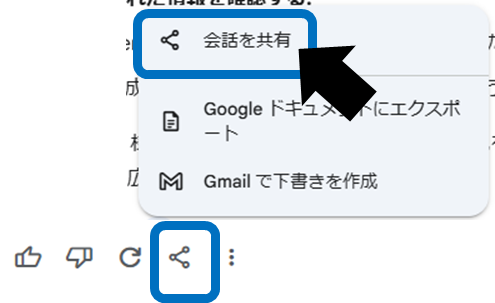
Once the public link is generated,g.co/gemini/share/xxxxxxA URL like this will be issued. Send the URL to the person you want to share it with. The recipient can view the same chat by simply clicking on the URL.
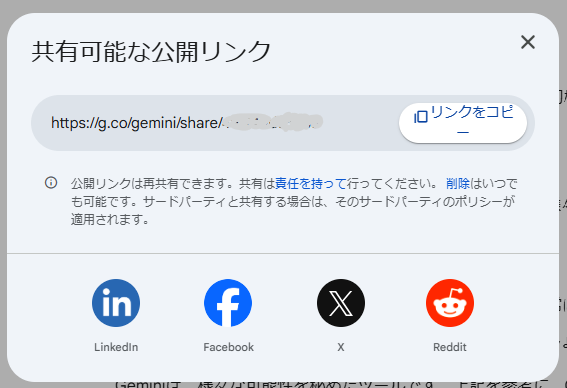
You can also continue chatting
Users who open the public link can ask additional comments and questions.Continue chatting(except for Gem chats and chats for people under 18).
The newly generated exchange is saved in the other party's "Gemini app activity".
Ideas for use in business situations
Here are some situations where you can use chat sharing.
Share ideas with your team
By passing the brainstorming results of new services and projects through a shared link, all company members can understand consistent information.Q&A sharing with business partners
After compiling FAQs about products and services using Gemini, simply send the chat to your business partners via URL. It's efficient and saves you the trouble of explaining.Knowledge base
By compiling frequently asked questions in Gemini and saving the link so that anyone in your company can refer to it, you can greatly improve your work efficiency.
In this way, if you make good use of Gemini's chat sharing function, you will be able to streamline your work and share information even more smoothly.
3 risks to be aware of when sharing chats
Although the chat sharing function is convenient, incorrect disclosure and risk management may lead to unexpected information leaks. Pay special attention to the following three points.
Anyone who knows the URL can view it
When a public link is posted on SNS or bulletin boards, it can be accessed by an unspecified number of people.For chats that contain highly confidential information such as customer information or confidential information, carefully check the content before publishing and carefully decide whether it really needs to be made public.Please.
Chances of someone receiving the link re-sharing it
The person who receives the link may forward the link to another person, potentially spreading the information to unintended third parties.Refrain from issuing public links to chats that contain "information that you absolutely do not want to leak to the outside world," and if necessary, delete them immediately after publishing.let's.
You can delete public links, but there are caveats.
Even if you remove the public link,Links posted on external sites (SNS, blogs, etc.) will not be deleted.. You will need to manually delete it on each site if necessary. Even after deleting the link,If someone with the link was viewing the chat in the Gemini app, the chat will not be deleted from that person's app history.
Public links are automatically deleted 6 months after creation. However, if you manually delete some of your chats or if the Gemini app's auto-delete setting is enabled, your public links may expire prematurely.
[How to delete public links]
At the bottom, go to Settings → Public Links.
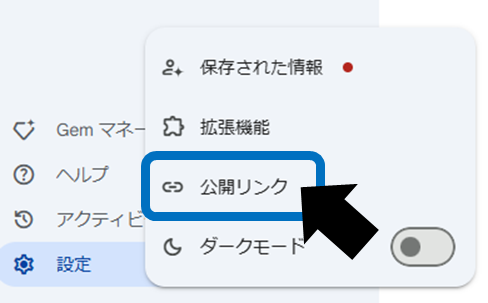
Click the "Remove public link" icon at the end of the link you want to remove. If you want to delete all at once, you can also select "Delete all links".
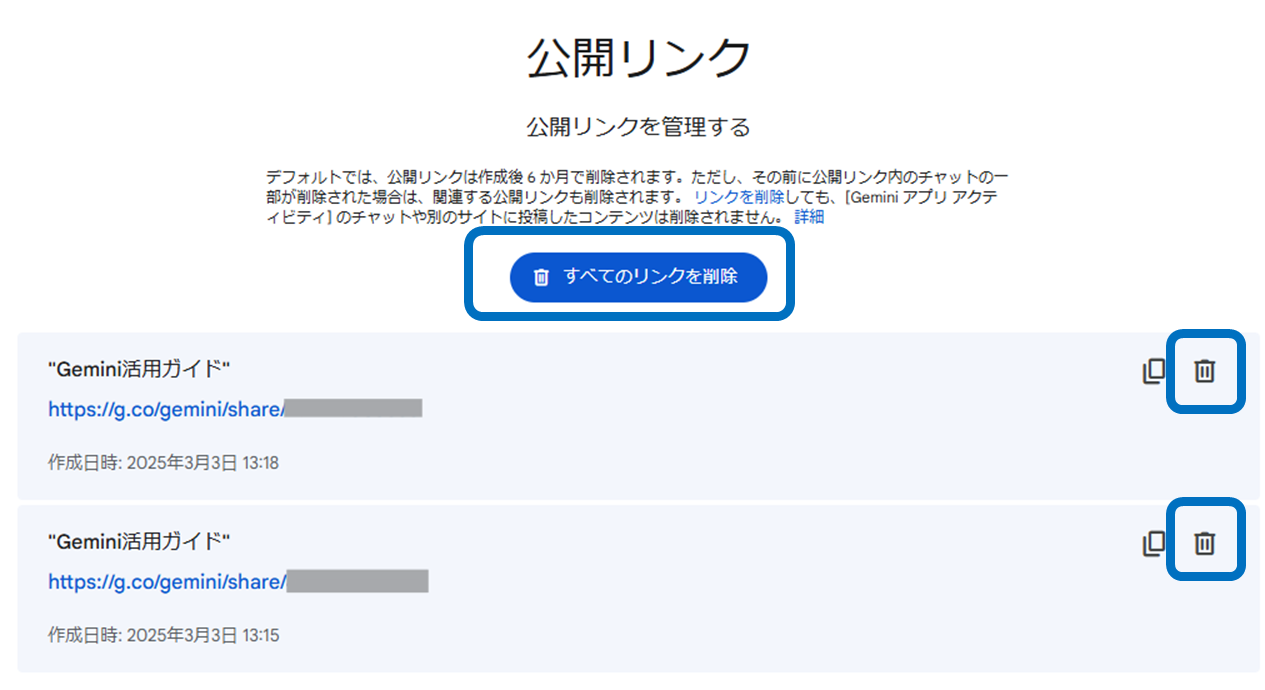
Even after you delete a public link, there's a chance that someone who had the link in the past may have saved your chat content.When handling highly confidential information, please minimize the use of chat sharing functions and be careful in managing the information..
summary
Gemini's "chat sharing" feature isReproduce the same interaction with one click of the URLThis is a convenient mechanism. If you make full use of it, your business will become more efficient, allowing you to share information with your team and respond immediately to business partners.
on the other hand,Public links can be accessed by anyoneDue to its characteristics, great care must be taken when handling it. Be sure to fully understand the handling of confidential information, the risks of re-sharing, how to delete links, etc.
It's convenient, but a little scary, so it's important to understand the risks and use it wisely to achieve both safety and efficiency.