
Gemini is an AI tool that can be used for a variety of purposes, such as writing sentences and generating ideas. By linking Gemini with Google Workspace, you can efficiently utilize data from Gmail, Google Calendar, and Google Drive, making your overall work even smoother.
In this article, we will explain the steps for linking with Google Workspace, specific usage examples, and common problems that occur when linking and how to solve them. Reading this book will give you tips on how to significantly improve your daily productivity.
table of contents
- table of contents
- How to integrate Google Workspace with Gemini
- Advantages of working with Google Workspace
- Be more efficient with Gmail
- Organizing information on Google Drive
- Schedule management with Google Calendar
- Common problems and how to deal with them
- Troubleshooting procedures
- Usage scenarios for Google Workspace integration
- summary
How to integrate Google Workspace with Gemini
To use the Gemini integration function, you need to subscribe to a Google Workspace Business or Enterprise plan. For personal use,Google Workspace LabsBy registering to participate, you will be able to use Gemini for free in four Google services (Gmail, Google Docs, Google Sheets, and Google Drive).
First, to connect Google Workspace to Gemini, you need to log in to Gemini's web app.
Gemini web app (gemini.google.com) and log in with your Google account. However, for Google Workspace accounts, administrator permission is required. If the integration does not work, ask your administrator to check.
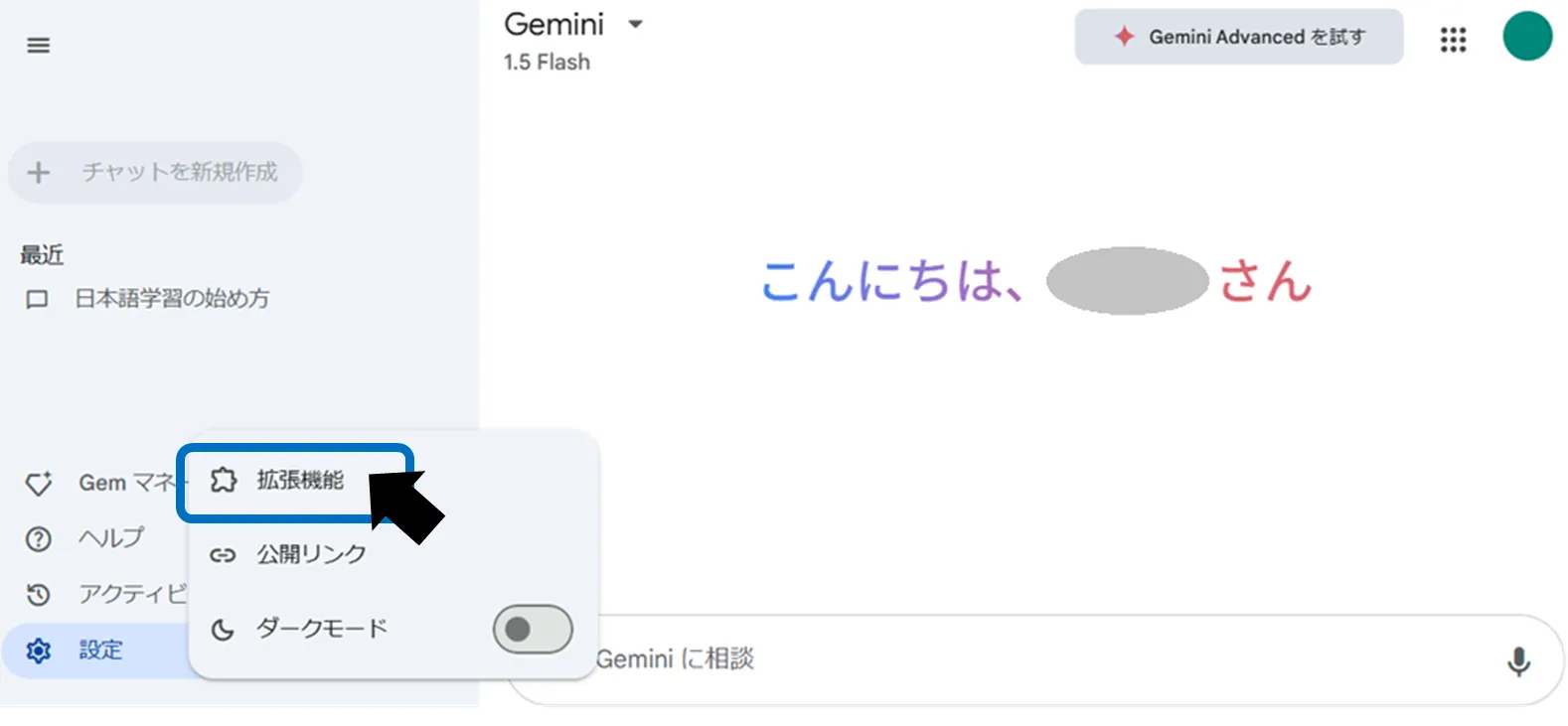
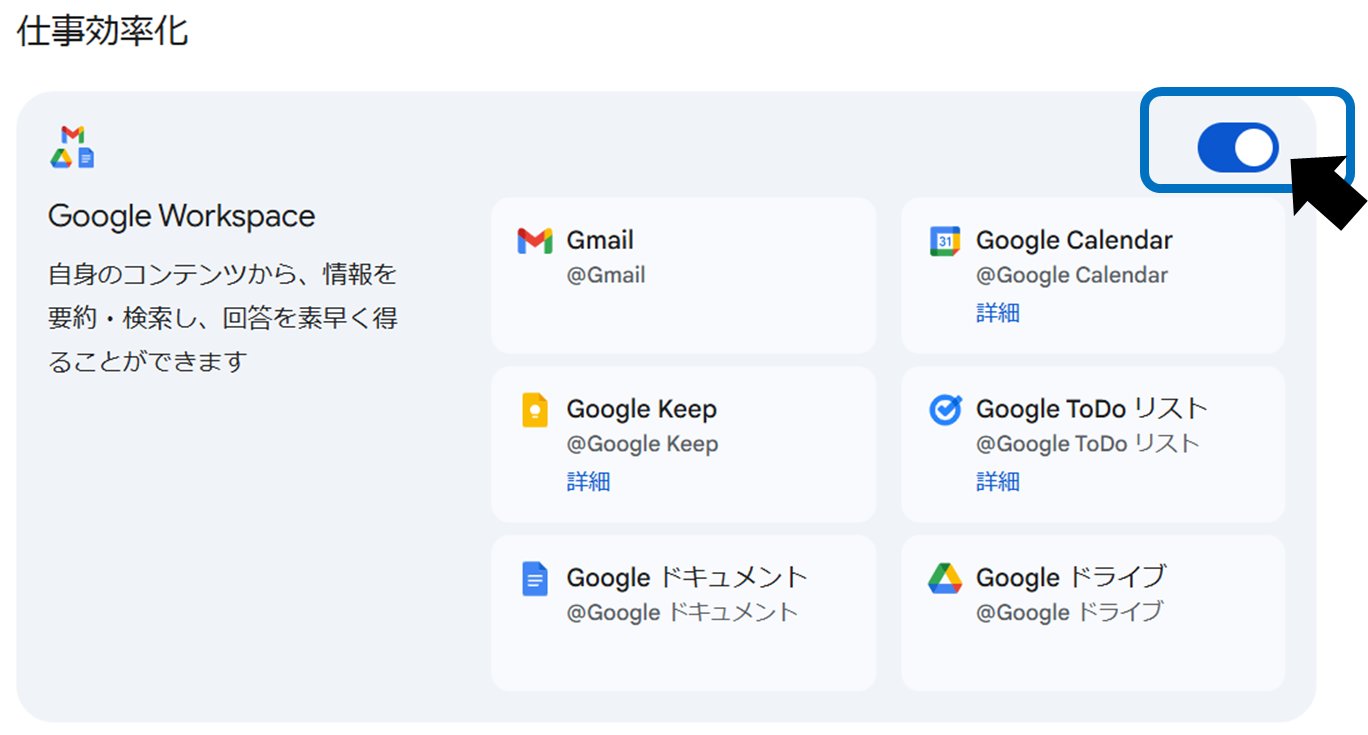
Next, select the Extensions tab from the Gemini settings screen and enable the "Google Workspace" item. To enable integration, you need to select the service you want to use (Gmail, Google Drive, Google Calendar, etc.) and give permission. By completing this setting, cooperation with each service will begin.
Advantages of working with Google Workspace
By linking Gemini and Google Workspace, you can integrate information and operate efficiently. Below, we will explain the specific benefits in detail.
Be more efficient with Gmail
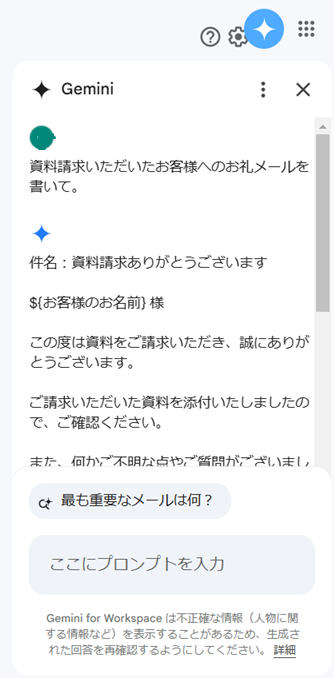
Integration with Gmail makes email creation dramatically easier. For example, by giving Gemini simple instructions like "Write a thank you email," it will automatically generate a draft with the right tone. You can directly transfer the draft to Gmail and send it, greatly reducing the effort required to compose an email.
Organizing information on Google Drive
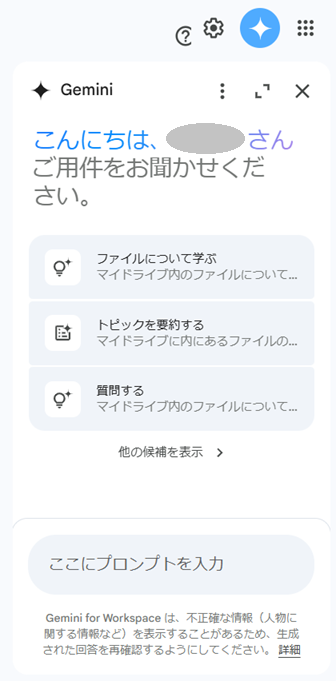
By using integration with Google Drive, you can quickly search for necessary information from a huge amount of files, or summarize long meeting minutes. Additionally, by analyzing spreadsheet data, you can manage data efficiently. This makes it easier to organize information and speed up decision-making.
Schedule management with Google Calendar
When linked with Google Calendar, you can add or change schedules using natural language instructions. For example, if you give an instruction like "Set up a meeting tomorrow at 10 o'clock," Gemini will add the event to your calendar and send notifications to participants if necessary. This feature makes daily schedule management more intuitive and efficient.
Common problems and how to deal with them
When linking Google Workspace with Gemini, an error may occur during setup. The main causes include insufficient administrator permissions and browser cache and cookies.
Troubleshooting procedures
Ask your administrator to confirm your access privileges
Please ask your Google Workspace administrator to confirm that access permissions to Gemini are set appropriately.
Delete browser cache and cookies
This may be caused by your browser's cache or cookies. Please delete it by following the steps below.
Open Chrome's settings menu. Go to "Privacy and Security". Select "Delete browsing history data" to clear cache and cookies.
Check the official help page
If the function does not work properly even after the integration is complete, please refer to Gemini's official help page.
Contact support
Please contact our support team if necessary. Please refer to the template below to prepare your support inquiry.
件名: [問題の簡潔な説明]お世話になっております。[あなたの名前/部署名]です。 次のような問題が発生しました。
[問題の詳細説明]
以下を添付しております。
- エラーのスクリーンショット
- 問題が発生した具体的な状況や手順
ご対応のほどよろしくお願いいたします。
Usage scenarios for Google Workspace integration
By linking Gemini and Google Workspace in actual work, you can improve efficiency in various situations.
Sales activities
You can now create quick and formal emails, and schedule adjustments can be managed all at once by linking with your calendar.
project management
You can summarize and analyze the materials in Google Drive and visualize your progress. Additionally, since it can be used to manage individual tasks, it can also be used to prevent omissions in tasks.
In this way, the collaboration between Google Workspace and Gemini is more than just adding functionality, it is a powerful tool that optimizes the overall work flow.
summary
Integration between Google Workspace and Gemini is the key to improving productivity in daily work. AI efficiently supports everyday tasks such as composing emails, searching for files, and managing schedules, which can save you a lot of time.
First, set up integration with Google Workspace and try out the basic operations of Gmail, Google Drive, and Google Calendar. Then, use Gemini to find ways to streamline your work that suit you. Please experience the convenience that can be gained by collaborating with AI.