
When using ChatGPT in business, there are situations where you want an immediate answer in a short amount of time, and situations where you want detailed consideration over time. Previously, we tended to rely on automatic judgment on the model side, but when using GPT-5's "Thinking", a toggle has been added to manually switch the thinking time (inference time), making it possible to control response speed and depth. The default is "Standard", and for Plus/Business you can choose Standard/Carefully, and for Pro you can choose Light/Standard/Carefully/Deep. Settings are available on the web the same day, and selected modes are saved (not synced with mobile at this time).
In this article, we will explain in an easy-to-understand manner how this function is provided and how it can be utilized in your business.
table of contents
- table of contents
- Overview of think time toggle functionality added to GPT-5
- Background of improvements born from user feedback
- How automatic mode and toggle specifications work
- Features of thinking time option
- Differences between plans and price comparison
- How to use ChatGPT on Web
- How to think about usage scenes in work
- Points to note and risks to check when introducing
- summary
Overview of think time toggle functionality added to GPT-5
Thinking Time Toggle is a new feature that allows you to adjust the "thinking time" before responding when using GPT-5's "Thinking" to suit the nature of the task.
The scope of provision varies depending on the plan.With Plus and Business, you can select "Standard" and "Carefully", and with Pro, "Light" and "Deep" are added.Standards are default values that are common to all users, and once a setting is changed, it is saved and reflected in future interactions.
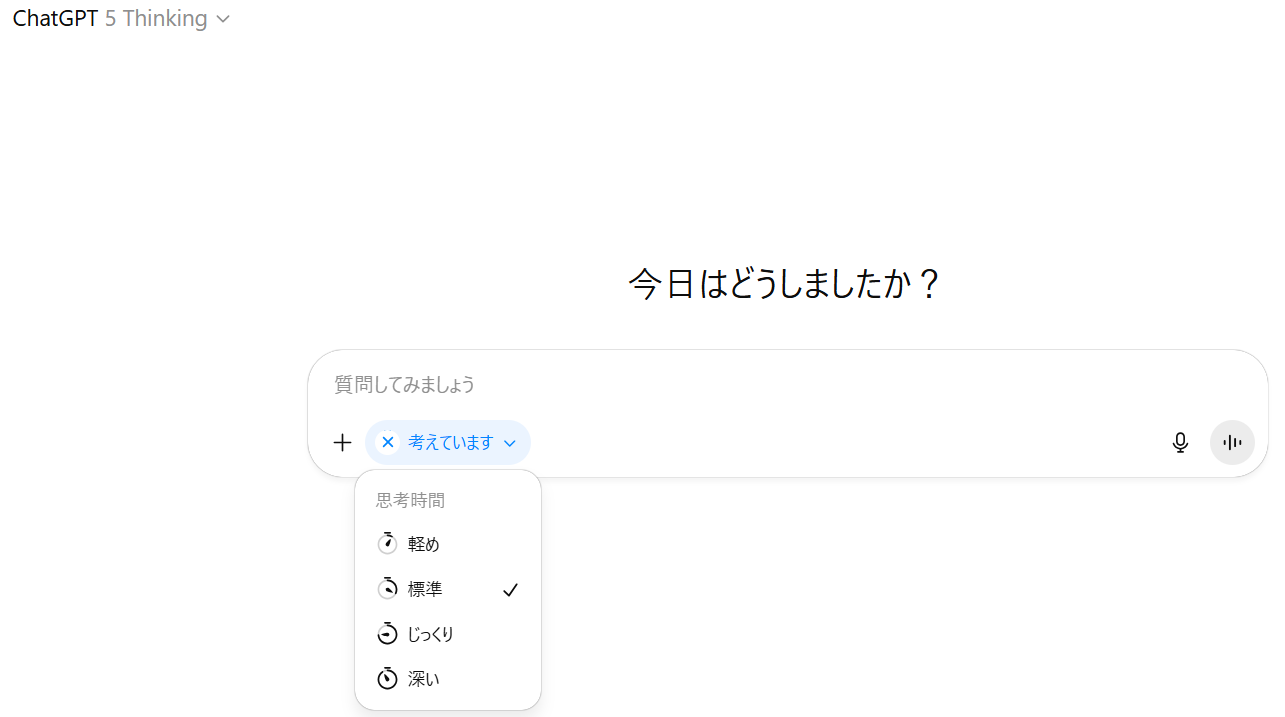
Currently available as a web version, the settings you choose will be retained on the web. However, it is not yet synchronized with mobile (iOS/Android), so support is planned for the future.
Background of improvements born from user feedback
In the official announcement, in response to the voice that there are cases where the response feels "long" when using Thinking of GPT-5,Speed and depth of reasoningIt is explained that it is now possible to explicitly select.
Addressing response time feedback: Designing to switch to deep inference only when necessary.
Use case optimization: Light/Standard is suitable for quick initial answers, Extended/Heavy is suitable for careful consideration and emphasis on comprehensiveness.
Organizing default values: Standard has been newly set as the default, and the reference point for operation has been clarified.
Persistence of settings: Once selected, it is saved in the conversation, reducing the hassle of resetting it.
How to proceed with provision: Start of provision on the web, with mobile expansion planned for the future.
This policy allows the balance between waiting time and output quality to be controlled on-site, making it possible to design the optimal response for each task.
How automatic mode and toggle specifications work
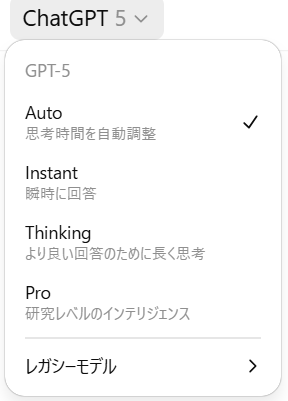
GPT‑5 is typicallyAutomatically switch between Chat (immediate response) and Thinking (deep reasoning)As for the design, the thinking time toggle isExplicitly specify the “depth and latency” of ThinkingIt is a means to do so. In the model pickerFast / Thinking / ProThere are also options available, allowing you to optimize both overall usage and “time allocation” within Thinking.
Features of thinking time option
You can use it more efficiently by switching from a simple summary to a detailed analysis depending on the situation.
option | Examples of main uses | Offer plan | remarks |
|---|---|---|---|
Light | Text summaries, canned replies, and light research drafts | Pro | Focus on fastest response |
Standard | A wide range of questions related to daily work, and provision of primary answers | Plus / Business / Pro | Default (default) |
Extended | Organizing issues, structuring materials, creating tables, etc.polite output | Plus / Business / Pro | Equivalent to the previous Plus default |
Heavy | Logic verification, requirement definition, analysis design, etc.Deep inference aiming for high accuracy | Pro | It takes time, but emphasis is placed on comprehensiveness. |
In practice, the starting point is to use Standard first and switch to Extended or Heavy as necessary.
Note that the default isAlways Standardin,Once changed, it will be retained for future interactions.(You can change it back if you want.) This mechanism allows us to stabilize the "perceived speed" and "degree of completion" of work.
As a point of caution,Available in web version, but not synchronized with mobileis. If you often use the device while on the move, it may be helpful to consider different usage scenarios.
Differences between plans and price comparison
When making decisions, it is important to understand "which plan can be adjusted to what extent."
plan | Monthly fee (official notation) | Think time toggle options | supplement |
|---|---|---|---|
Plus (individual) | $20/month | Standard/Extended | Function expansion/priority access, etc. |
Pro (individual) | $200/month | Light / Standard / Extended / Heavy | Highest level of access and higher limits |
Business (workspace) | $25 / user / month (paid annually) / $30/month (paid monthly) | Standard / Extended (*) | Security/management functions, connectors, etc. |
* Business is designed to have a "Flexible" usage limit for Thinking. Details include upper limit and credit handlingOfficial comparison tablePlease refer to
How to use ChatGPT on Web
When you select GPT‑5's Thinking mode in the model picker, a thinking time toggle will appear in the chat field. Choose the one that best suits your purpose: light / standard / slow / deep. Your initial selection will be saved for subsequent conversations. Web settings do not sync to mobile at this time.
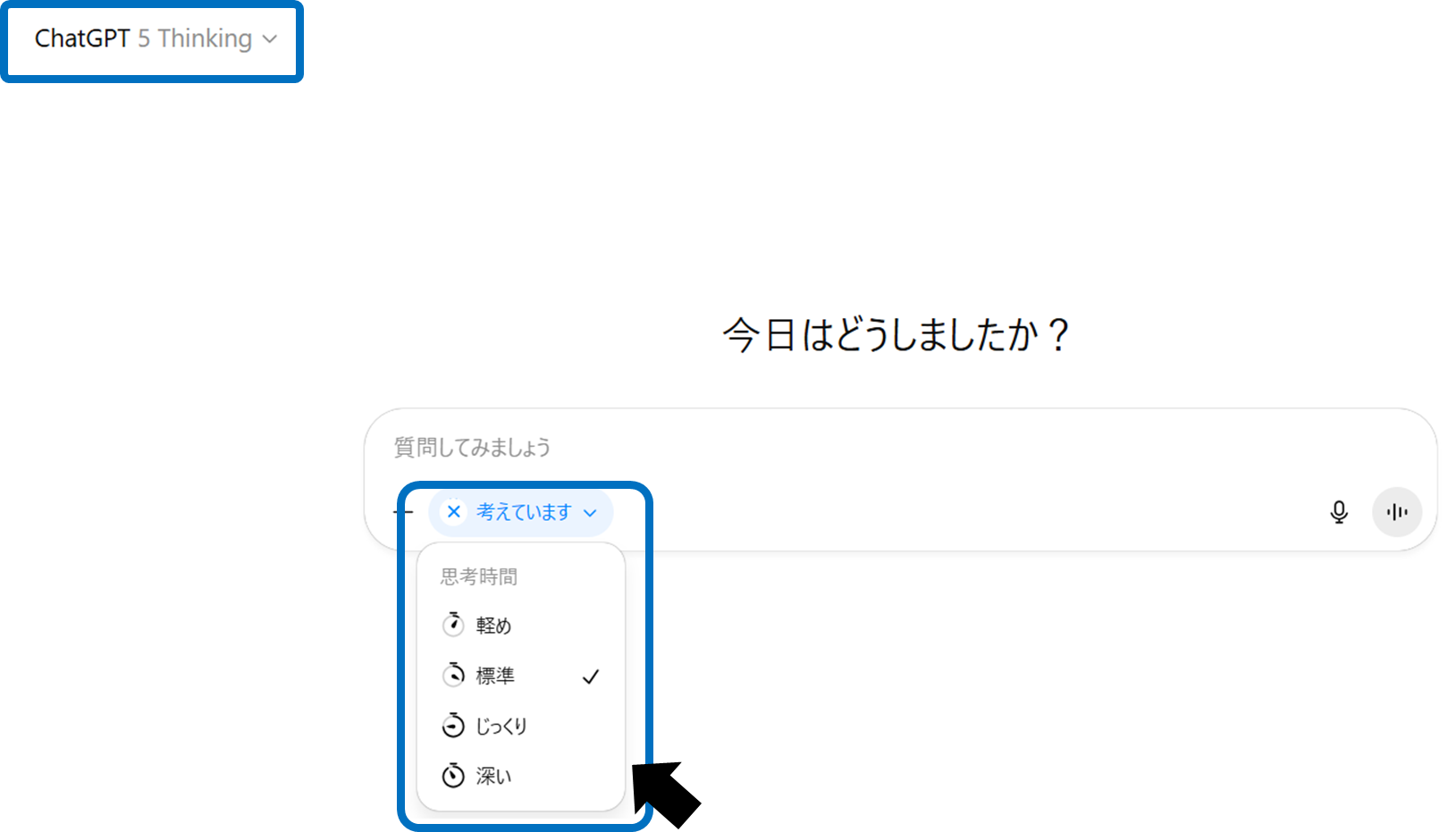
The work flow is simple,Switch according to the task at handJust being aware of this is enough.
How to think about usage scenes in work
In field work,There is a clear distinction between situations where speed is valuable and situations where accuracy and comprehensiveness are valuable..
Immediate response required
Initial answers, summaries, minor corrections, and suggestionsLight/Standard.
politeness is necessary
Requirements definition, comparative study, specification review, analysis designcarefully/deeply.
mixed work
The draft isstandard,Carefully/deeply at the review stageSwitch to.
cost consciousness
Pro offers more freedom but is also more expensive.Standard on Plus/Business → CarefullyIt is easy to produce sufficient effects even when operated.
“Switching operations” that match the nature of the task maximize time efficiency.
Points to note and risks to check when introducing
The think time option is a convenient feature, but if you keep the following in mind when using it, you can avoid unnecessary waiting time and overconfidence.
Balance between speed and quality
Heavy takes longer to process. Not every time,Limited to important situationsIt is effective to use it as follows.
Thoughts about settings
Once selected, the option will be retained. Please review it regularly to avoid continuing to use unnecessarily heavy settings.
mobile async
Even if you switch on the web, it will not be reflected on mobile. It is safe to set up separate rules for use when going out.
Misuse risk
Even if you make deep inferences,Fact confirmation and rights confirmation are separate processes.must be secured by. Please design with the limitations of the model in mind.
Log/Reproducibility
For important tasks, creating a mechanism to save and share communications (e.g. Projects) will ensure reproducibility.
By taking these precautions into account, you can choose the thinking time option.Incorporate safely and effectively into your workYou can.
summary
With GPT‑5's think time toggle, you can now adjust response speed and inference depth at your fingertips depending on your application. Plus/Business is standard/careful, Pro is light to deep, and the default is standard. Settings are available on the web, selections are saved, and are not synced to mobile. In terms of operation, it is effective to switch over in stages, such as Standard for everyday use and careful/deep control for important situations. When installing, check data control and security requirements, and choose the appropriate combination based on the cost-effectiveness of each plan. First, decide "which processes should be made faster and which processes should be made more accurate" in the existing work flow, and use the thinking time toggle in a planned manner.